Leave Management
Learn how to apply leave, track leave requests, review leave details, and manage your leave history using the Leave module.
Leave Management
The Leave module allows employees to apply for leave, track leave requests, and view previous leave history from one place.
Managers can review leave requests before approving or rejecting them. This helps maintain proper attendance records and ensures work is planned in advance.
Every leave request is stored in the system so employees and managers can review previous leave history whenever required.
Leave List
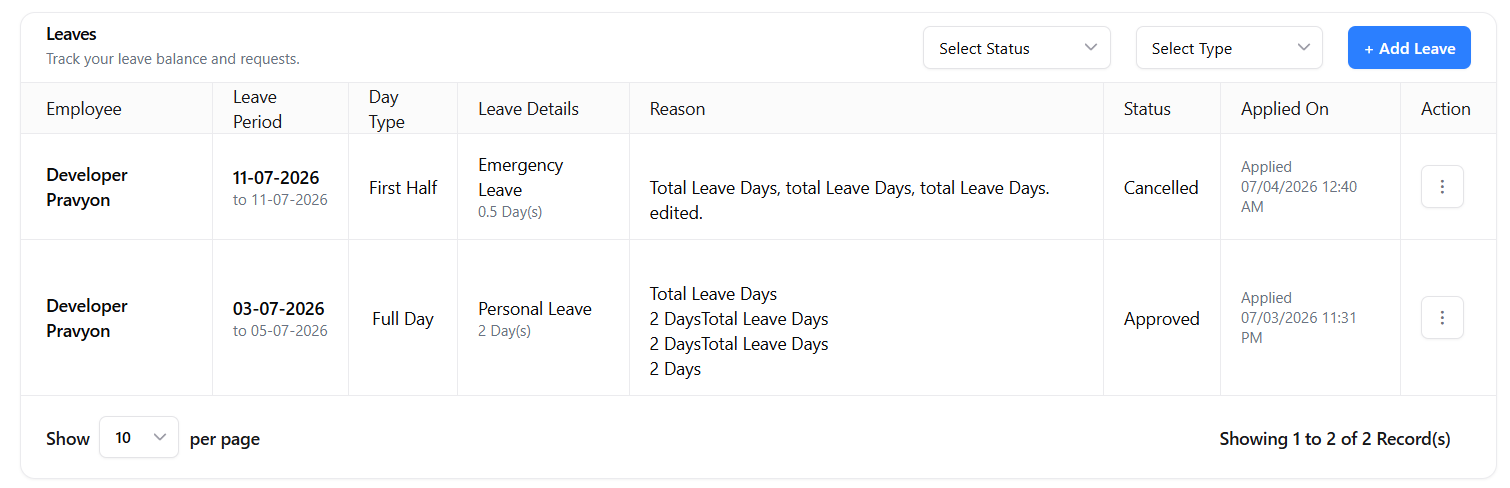
Click Operations → Leave from the left navigation menu to open the Leave module.
This page displays all leave requests submitted by you. You can quickly check leave type, leave period, status, applied date, and other information.
Filters
Filters help you quickly find leave requests without searching the complete list.
-
Status
View leave requests by status such as Pending, Approved, Rejected, or Cancelled. -
Leave Type
View leave requests for a specific leave type such as Personal Leave, Sick Leave, Work From Home, or other leave types available in your company.
Apply Leave
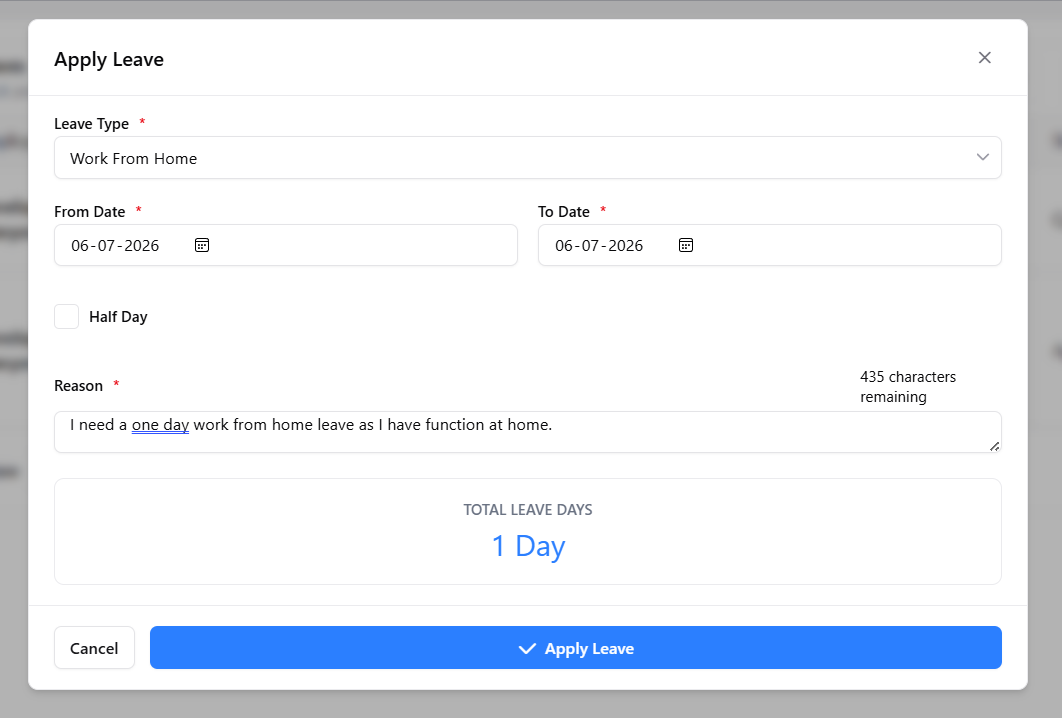
Click the Add Leave button to submit a new leave request.
Form Details
-
Leave Type
Select the appropriate leave type according to your requirement. -
From Date
Select the first day of your leave. -
To Date
Select the last day of your leave. -
Half Day
Enable this option if you are applying for only half-day leave. -
Reason
Enter a clear reason for your leave. Managers use this information while reviewing your request. -
Total Leave Days
The system automatically calculates the total number of leave days based on the selected dates.
Leave Review
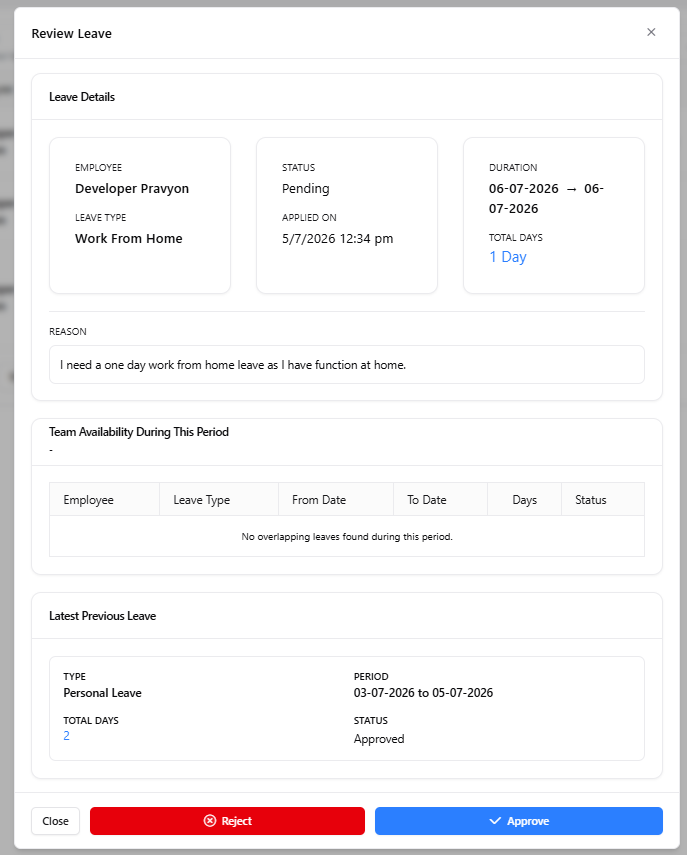
Before approving or rejecting a leave request, managers can review complete leave information.
Information Available
- Employee details
- Leave type
- Leave duration
- Total leave days
- Leave reason
- Team members who are already on leave during the selected period
- Previous leave history of the employee
This information helps managers make better decisions before approving leave requests.
Leave Actions
Each leave request contains additional actions.
-
View Details
Opens complete leave information. -
Edit
Update leave details before approval, if editing is allowed. -
Cancel
Cancel the leave request if it is no longer required. -
Approve / Reject
Managers can approve or reject leave requests after reviewing all information.
Benefits
- ✅ Easy leave application process.
- ✅ Automatic leave day calculation.
- ✅ Complete leave history in one place.
- ✅ Better planning for employees and managers.
- ✅ Prevents overlapping leave requests.
- ✅ Faster approval process.
- ✅ Improves attendance management.
Related Documentation
WhatsApp Business Integration
Connect your WhatsApp Business account with Pravyon to send quotations, invoices, notifications, and customer updates directly from CRM.
IndiaMART Integration
Connect your IndiaMART account with Pravyon to automatically import inquiries and manage leads inside CRM.
Lead Notes and User Tagging
Add notes, reminders, and tag employees in lead notes. Tagged employees will receive dashboard and WhatsApp notifications.
Manage Leads
View and manage all your leads in one place. You can filter leads, update status, assign to employee, send quotation, and track notes and follow-ups.